Build Software Applications using AI from Texas McCombs
Professional Certificate in Generative AI and Agents for Software Development
 Application closes on
15th Oct 2026
Application closes on
15th Oct 2026

 Speak with our expert
+15127467633
Speak with our expert
+15127467633




Learn more about the course
Get details on syllabus, projects, tools, and more
Upskill Your Teams with Future-Ready Skills
Empower your workforce with programs from leading universities
-
Team Pricing
Maximize ROI with exclusive cost-effective plans for group enrollments
-
Team Learning Dashboard
Track progress & outcomes at the team level
-
Customized Learning Paths
Tailor the program to align with your team's goals and drive meaningful outcomes.

Enter your organisation name
This will help us customise the proposal plans

Professional Certificate in Generative AI and Agents for Software Development
Application closes 15th Oct 2026
Why Should You Join This Program?
-

Hands-On Full-Stack AI Software Development Program
Build a practical understanding of AI-powered software applications from Texas McCombs faculty & industry experts and work on hands-on projects & case studies using 18+ tools
-
Texas McCombs is a top-ranked US University
Learn from a top U.S. business school, ranked #1 in Information Systems, #6 for Master’s in Business Analytics, #7 in Artificial Intelligence, and #9 in Business Analytics in the U.S


LEARNING OUTCOMES
What Will You Learn to Build and Apply?
Through a structured learning journey, you will build the capability to:
-
Build full-stack AI applications using modern frameworks, databases, and software development tools
-
Integrate LLMs into software applications using APIs, prompt engineering, and retrieval-based workflows
-
Develop AI agents and agentic workflows using industry frameworks, tools, and development platforms
-
Build secure backend services and REST APIs with authentication, testing, and AI-assisted workflows
-
Deploy AI-powered applications on AWS using modern cloud infrastructure and deployment practices
-
Create a portfolio of AI projects that demonstrates expertise in AI-enabled software development
Earn a certificate of completion and CEUs from Texas McCombs, a top-ranked U.S. University
-
#1 (U.S., Big Data Management) in MS Business Analytics
Eduniversal (2025)
-
#6 Analytics
U.S. News & World Report (2025)
-
#6 Business Programs
U.S. News & World Report (2025)
-
#7 in MS - Business Analytics
QS World University Rankings (2022)
-
#7 in MS Business Analytics
The Financial Engineer Times (2025)
-
#3 in Information Systems Graduate Programs
U.S. News & World Report (April 2025)
-
#7 Public University in the U.S.
U.S. News & World Report, 2026
-
#6 in Executive Education - Custom Programs
Financial Times, 2022


KEY PROGRAM HIGHLIGHTS
Why Choose This Program?
-
Learn from Texas McCombs Faculty
Build the foundations and technical judgment needed to develop AI-powered applications through a curriculum designed and taught by Texas McCombs faculty
-
Attend Weekly Live Mentorship Sessions with Industry Experts
Learn from AI practitioners through interactive mentorship sessions featuring real-world AI software development use cases, implementation frameworks, and industry insights
-
Work on Hands-On Projects and Build a Shareable Portfolio
Apply concepts through multiple full-stack and AI-powered projects that demonstrate your ability to build, deploy, and scale AI-enabled software applications
-
Develop Full-Stack AI Applications With Industry Tools
Build practical expertise using 18+ tools and technologies, including GitHub Copilot, Claude Code, LangChain, React, Node.js, MongoDB, and AWS
-
Get Personalized Learning Support
Get 1:1 support from a dedicated Program Manager to stay on track and complete the program with ease
-
Earn a Recognized Credential from Texas McCombs
Earn a Certificate of Completion from the McCombs School of Business at The University of Texas at Austin upon successful completion of the program

Skills you will learn
FULL-STACK WEB APPLICATION DEVELOPMENT
AI-ASSISTED SOFTWARE DEVELOPMENT USING GITHUB COPILOT
AI AGENT AND WORKFLOW IMPLEMENTATION WITH LANGCHAIN & CLAUDE CODE
BACKEND API DESIGN, SECURITY, AND AUTHENTICATION
FRONTEND DEVELOPMENT WITH REACT AND STATE MANAGEMENT
LLM INTEGRATION AND PROMPT ENGINEERING
TESTING, DEPLOYMENT, AND PRODUCTION READINESS
FULL-STACK WEB APPLICATION DEVELOPMENT
AI-ASSISTED SOFTWARE DEVELOPMENT USING GITHUB COPILOT
AI AGENT AND WORKFLOW IMPLEMENTATION WITH LANGCHAIN & CLAUDE CODE
BACKEND API DESIGN, SECURITY, AND AUTHENTICATION
FRONTEND DEVELOPMENT WITH REACT AND STATE MANAGEMENT
LLM INTEGRATION AND PROMPT ENGINEERING
TESTING, DEPLOYMENT, AND PRODUCTION READINESS
- Overview
- Learning Journey
- Curriculum
- Projects
- Tools
- Certificate
- Faculty
- Mentors
- Career Support
- Fees
- FAQ
Who Is the Program For?
Professionals looking to build AI-powered applications or transition into AI-enabled software development role
-
Software Developers
Build practical expertise in GenAI and AI agents to create AI-powered applications and accelerate software delivery
-
IT and Technology Professionals
Integrate AI into software workflows to improve productivity, automate repetitive tasks, & build AI-enabled solutions
-
Engineering and Technology Leaders
Develop the technical depth needed to drive AI adoption & implementation across engineering teams
-
Professionals Transitioning into AI-Enabled Roles
Build AI-powered applications and a project portfolio to transition into AI-enabled software roles
How's the Learning Experience of the Program?
Build strategic judgement and human intuition with our unique structured learning approach
-
Learn from Experts
Learn from Texas McCombs faculty and industry experts to master AI strategy and implementation
-
Learn By Doing
Work on business problems & case studies using 18+ tools & build an e-portfolio of AI projects
-
Earn a University Credential
Earn a certificate of completion from Texas McCombs upon completion of the program
-
Get Support Throughout the Learning Journey
Program managers will help you stay on track, navigate key milestones & complete the program




What Will You Learn in the Program?
Designed by the McCombs School of Business at The University of Texas at Austin, in collaboration with leading industry experts, the curriculum covers key topics like GenAI-powered full-stack development, AI-assisted coding, MERN stack, LLMs, AI agents, testing, and AWS deployment.
-
Hands-On
Full-Stack Projects
-
20+
Tools And Frameworks
-
Weekly
Live Mentorship Sessions
Prework: Web Development and JavaScript Foundations
This prework establishes the foundational knowledge required for the program. Learners develop core web development skills and a strong understanding of modern JavaScript, preparing them for full-stack and AI-assisted development.
Concepts Covered:
Course 1: Introduction to Generative AI and AI Tools for Coding
Week 01 | Introduction to Generative AI and AI Tools for Coding
Course 2: Building the Backend
Week 02 | Building the Backend - 1 (MongoDB and Mongoose)
Week 03 | Building the Backend - 2 (Express - 1)
Week 04 | Building the Backend - 3 (Express - 2)
Week 05 | Learning Break
Course 3: Building the Frontend
Week 06 | Building the Frontend - 1 (React - 1)
Week 07 | Building the Frontend - 2 (React - 2)
Week 08 | Building the Frontend - 3 (React - 3)
Week 09 | Building the Frontend - 4 (React - 4)
Week 10 | Learning Break
Course 4: AI Applications and Agents
Week 11 | Building AI-Powered Applications
Week 12 | Introduction to AI Agents and Agentic Systems
Week 13 | Agent-Driven Development with Claude Code
Course 5: Deployment on AWS
Week 14 | Deployment on AWS
Self-Paced Module | Claude-Based AI Workflows
This module is designed to build practical capability in applying Generative AI and Agentic AI using the Claude ecosystem in real-world contexts. Participants build the ability to design, execute, and evaluate AI-driven workflows for real-world applications, supported by ~5 hours of structured learning.
Design and Execute AI Workflows
Build and Deploy AI Systems at Scale
Disclaimer
The curriculum, projects and tools listed are indicative and subject to updates as technology evolves.
Note: The curriculum listed above are indicative and subject to updates as technology evolves.
What Case Studies & Projects Will You Solve?
Work on real-world case studies across industries & functions using 18+ AI tools and technologies

Software Development
Task Manager with GitHub Copilot
Description
Practice prompting and auto-completion in GitHub Copilot within VS Code by building a functional Task Manager application.
Skills you will learn
- GitHub Copilot
- VS Code
- JavaScript / Node.js
- API integration
- HTML
- CSS

Database Engineering
StackOverflow App with MongoDB & Mongoose
Description
Build schemas for a StackOverflow application on MongoDB Atlas using Mongoose. Implement CRUD operations and validate backend functionality through testing.
Skills you will learn
- MongoDB Atlas
- Mongoose
- Node.js
- JavaScript

API Engineering
Building APIs with JWT Authentication for StackOverflow
Description
Implement API handlers to create and modify questions and answers. Implement secure user authentication using JWT and build authentication middleware using Generative AI. Write unit and integration tests to ensure end-to-end backend security and reliability
Skills you will learn
- Node.js
- Express
- API Development
- Unit Testing
- JWT
Frontend Developement
Frontend Development with React Bootstrap for StackOverflow
Description
Generate React code for the UI pages of the StackOverflow application. Integrate React Bootstrap into the components, use React hooks for fetching and updating data
Skills you will learn
- React
- Javascript
- GitHub Copilot
- UI Component Development

Note: The projects listed above are indicative and subject to updates to the curriculum.
Which Tools Will You Learn and Apply?
Work with a suite of 20+ modern, industry-standard technologies and GenAI tools used by global teams
-
Github Copilot
-
ChatGPT
-
Claude Code
-
LangChain
-
Javascript
-
HTML 5
-
CSS3
-
Node.js












Note: The tools listed above are indicative and subject to updates as technology evolves.
Earn a certificate of completion
Earn a globally recognized credential from a top U.S. university and showcase it to your network
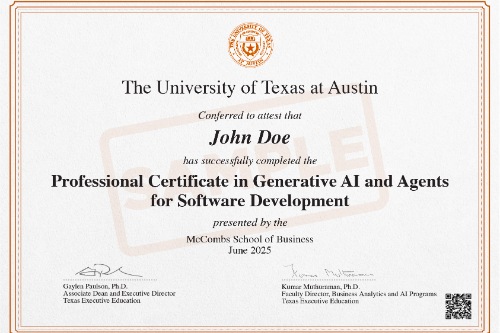
* Image for illustration only. Certificate subject to change.
Who Are the Faculty for the Program?
Learn from renowned Texas McCombs faculty and build technical intuition to make credible, strategic decisions
-
Dr. Kumar Muthuraman
Faculty Director, McCombs School of Business, The University of Texas at Austin
Faculty Director, Center for Analytics and Transformative Technologies
21+ years' experience in AI, ML, Deep Learning, and NLP.
Know More
-
Abhay Samant
Chief Software Engineer at NI, Professor of Practice, The University of Texas at Austin
Has 24 years of R&D, product strategy, business management experience
His research interests are in ML and cognitive cyberphysical systems
Know More
-
Sidney Rosario
Senior Faculty, Great Learning
PhD, INRIA France | B.Tech, IIT Bombay
Former Director of Curriculum, Masai School
Know More





 LinkedIn Profile
 University Link
Who Are the Mentors for Weekly Live Sessions?
Learn from seasoned industry mentors in weekly live sessions to apply concepts and build practical skills
-
David Y Stephenson
Engineering Mentor at Objective Enterprises
-
Isaac Grey
Senior Software Engineer at Prompt
-
Andres Cala
Senior Software Engineer at athenahealth






Note: The mentors listed above are indicative and subject to change based on availability and scheduling.
What Support Will You Receive to Advance in Your Career?
-
1:1 Career Sessions
Interact personally with industry professionals to get valuable insights and guidance
-
Interview Preparation
Get an insiders perspective to understand what recruiters are looking for
-
Resume and Profile Review
Get your resume and LinkedIn profile reviewed by our experts to highlight your AI & ML skills & projects
-
E-Portfolio of Hands-On Projects
Build an industry-ready portfolio to showcase your mastery of skills and tools




Course Fees
The course fee is USD 2,950
EMI starting at USD 1,000/month only
Invest in your career
-
14-Week Online Comprehensive Journey: Build job-ready Data Analytics & AI skills
-
Structured Learning: Dedicate 8–10 hours weekly to faculty videos, mentor sessions, and hands-on AI projects
-
Dedicated Mentorship: Attend weekly live online sessions with top Industry Mentors and build AI Agents
-
Earn a globally recognized Texas McCombs certificate to validate your AI expertise


Easy payment plans
Avail our EMI options & get financial assistance
-
INSTALLMENT PLANS
Upto 3 months Installment plans
Explore our flexible payment plans
View Plans
Third Party Credit Facilitators
Check out different payment options with third party credit facility providers



*Subject to third party credit facility provider approval based on applicable regions & eligibility

Application Process
The application process is conducted on a rolling basis and will be closed once the requisite number of candidates are enrolled.
-
Submit Application
Candidates can apply to the program online
-
Review
Eligible applications will be reviewed by a panel from Great Learning
-
Join the Program
An offer letter will be sent to the selected candidates


Designed for
- Individuals seeking to build or advance careers in modern software development by leveraging full-stack technologies and Generative AI tools
Batch Start Date
-
Online · To be announced
Admissions Open
Frequently Asked Questions
What is the Certificate in Generative AI for Developers?
The Professional Certificate in Generative AI and Agents for Software Development by the McCombs School of Business at the University of Texas at Austin is a 14-week program designed to equip learners with the skills required to design, build, test, and deploy full-stack applications enhanced with Generative AI capabilities.
What is the duration and format of the Professional Certificate in Generative AI for Software Development?
The “Professional Certificate in Generative AI and Agents for Software Development” is a 14-week program delivered online, featuring recorded video lectures by Texas McCombs faculty and weekly live mentorship sessions with global industry practitioners.
How is this program different from a typical full-stack developer course without AI?
Unlike typical Full-Stack development certificate courses, this program
- Emphasizes Generative AI for software development, AI-assisted coding, and agent-based workflows in addition to core full-stack skills.
- Learners work with modern, industry-standard technologies, including Node.js, Express, MongoDB, React, Redux, OpenAI APIs, LangChain AI agents, AWS, and GenAI tools.
- It combines modern MERN stack development with Generative AI tools, AI agents, and cloud deployment.
What skills will I gain from this program?
The program is designed to equip you with the skills required to design, build, test, and deploy full-stack applications while leveraging Generative AI capabilities for software development. Throughout the program, you are trained not only to use AI tools but also to critically evaluate AI-generated results, apply best practices in software design, testing, security, and scalability, and integrate AI responsibly into production-ready systems, preparing you for high-growth GenAI developer and AI Full-Stack developer roles.
What is the role of the Texas McCombs in delivering this program?
The McCombs School of Business at The University of Texas at Austin is responsible for the academic design and delivery of the program. They develop the curriculum based on their research in AI, Data Science, and Business Applications.
What certificate do I receive upon completing the program?
Upon program completion, you will earn a globally recognized Certificate of Completion from the McCombs School of Business at The University of Texas at Austin.
What career outcomes can I expect after completing this program?
After completing the program, you will be equipped to:
- Design and build end-to-end full-stack web applications using modern frontend and backend technologies.
- Develop scalable and secure backend services, including REST APIs and authentication workflows.
- Build responsive, state-driven frontend applications and integrate them with backend systems.
- Apply Generative AI tools effectively across coding, testing, debugging, and documentation workflows.
- Implement and manage AI agents and agent-based workflows for multi-step automation tasks.
- Deploy full-stack applications to cloud environments following industry best practices.
Who should enroll in this course?
This program is best suited for:
- Software development professionals looking to enhance their skills with Generative AI tools for efficient coding, testing, and problem-solving.
- IT and technology professionals who want to integrate AI into their workflows to improve productivity, automation, and team collaboration.
- Technology managers and consultants are aiming to leverage Generative AI to optimize development processes, accelerate innovation, and drive high-performing teams.
What is the application process for this program?
The admission process is conducted on a rolling basis and will be closed once the requisite number of candidates is enrolled.
- Apply: Fill out an online application form
- Review: Eligible applications will be reviewed by a panel from Great Learning.
- Join the program: An offer letter will be sent to the selected candidates.
What makes this Professional Certificate in Generative AI and Agents for Software Development suitable for working professionals?
The program is delivered in an online format with structured learning, recorded content, and applied projects, allowing working professionals to balance learning with existing commitments while gaining industry-relevant skills in Generative AI and full-stack software development.
What is the fee for this program?
The fee for the Professional Certificate in Generative AI and Agents for Software Development is $2,950 USD.
Are there any installment or flexible payment options available?
Payment options, including installments or flexible plans, may vary. Learners are advised to connect with a Program Advisor for the most accurate and up-to-date fee and payment details.
Who will be teaching this program?
The program is taught by world-renowned Texas McCombs faculty along with experienced global industry mentors, combining academic rigor with hands-on, real-world software development and AI expertise.
What projects are included in this program?
The program includes hands-on, end-to-end projects where learners build full-stack applications enhanced with Generative AI features. These projects involve applying AI-assisted coding tools, integrating LLM-powered capabilities into applications, developing AI-driven agents for real-world use cases, and deploying full-stack applications to cloud environments.
What are the subjects covered in this program?
The program covers Generative AI and full-stack development topics essential for using AI for software development and AI for web development, including:
- Introduction to Generative AI and AI Tools for Coding
- MongoDB/Mongoose CRUD
- Express APIs/middleware
- JWT authentication
- React components/state/routing/Redux
- LLM integration
- AI agents (LangChain/Claude)
- AWS deployment
Does the program cover Prompt Engineering for software development?
Yes. Prompt Engineering is introduced in the early modules and applied across backend, frontend, testing, and AI integration tasks to improve code quality, productivity, and AI-assisted workflows.
Which backend technologies are included in the curriculum?
Learners work with Node.js, Express.js, MongoDB, and Mongoose, focusing on REST API development, middleware, database schema design, and CRUD operations, supported by Generative AI tools. These backend skills are critical for an Artificial Intelligence Software Developer or Full-Stack Software Developer building scalable, AI-powered applications.
What kind of learning support will I get from this program?
Through this program, you can get personalized assistance from a dedicated Program Manager and Academic Support through project discussion forums and peer groups.
What roles can I pursue after completing a Generative AI and Agents for Developers course online?
Top roles you can pursue after completing an online Generative AI for Developers course includes:
Full-Stack Developer
Backend Developer
Software Architect
Automation Engineer
Frontend Developer
AI Application Developer
Software Engineer (AI Integration)
How does this full-stack developer course use Generative AI to improve software development workflows?
The course introduces Generative AI concepts and tools that can be applied across the software development lifecycle, including coding, testing, and application development, alongside full-stack technologies.
Will this program help me become a Generative AI developer with full-stack skills?
The program helps learners build an understanding of Generative AI alongside full-stack development, enabling them to apply AI techniques within software development projects and applications.
Are learners trained in testing and quality assurance?
Yes. Learners will use Vitest to write and execute tests for backend services, APIs, and React components, ensuring reliability and performance of both traditional and AI-powered applications.
Is this program suitable for full-stack developers looking to upskill in AI?
Yes. This program is well-suited for full-stack developers who want to build on their existing development skills by learning how Generative AI tools and models can be integrated into modern software applications and development workflows. It is designed to prepare learners for Full-Stack AI developer roles.
Will there be a chance to interact with the mentors?
Yes. Learners can interact with mentors through live weekly mentorship sessions led by industry experts like Sidney Rosario and Vik Williamson. Ongoing support is provided via discussion forums and peer groups, along with direct feedback on e-portfolio development to guide learning and career progression.
How does this program equip developers with the skills to apply AI in web development?
This program integrates Generative AI with frontend and backend technologies, helping learners apply AI for web development across full-stack applications, from UI logic to AI-powered backend services.
 Application Closes
15th Oct 2026
Application Closes
15th Oct 2026